
01 / Detect
Automated race broadcast - rFactor 2 / LMU
Every grid deserves a pro broadcast.
BattleDirector finds the best fights on track and narrates them live. Now every race you run gets covered like it matters.
Windows - rFactor 2 and Le Mans Ultimate - iRacing coming
How it works
02 / Direct
Pick the best camera
03 / Connect
Narrate the action
04 / Track
Follow the championship
Inside the director
What you need
- Your sim
- rFactor 2 or Le Mans Ultimate. iRacing is coming.
- BattleDirector
- Runs on Windows, alongside the sim.
That's the whole list.
Questions
What is BattleDirector?
BattleDirector is an automated broadcast director for sim racing. It reads live telemetry, works out which car is worth showing, picks the camera, and commentates the action out loud - so a league race can be streamed properly without anyone sitting in an observer seat all evening.
Which sims does it work with?
rFactor 2 and Le Mans Ultimate today. iRacing support is planned. BattleDirector runs on Windows.
Can I try it yet?
BattleDirector is in active beta. Preview access is handed out through the Discord, ahead of Steam early access - so joining is currently the fastest way to get your hands on it, not just a mailing list.
How is this different from an auto-camera plugin?
Sure - iRacing has an auto camera, and there are plugins for rFactor 2. Le Mans Ultimate has nothing at all.
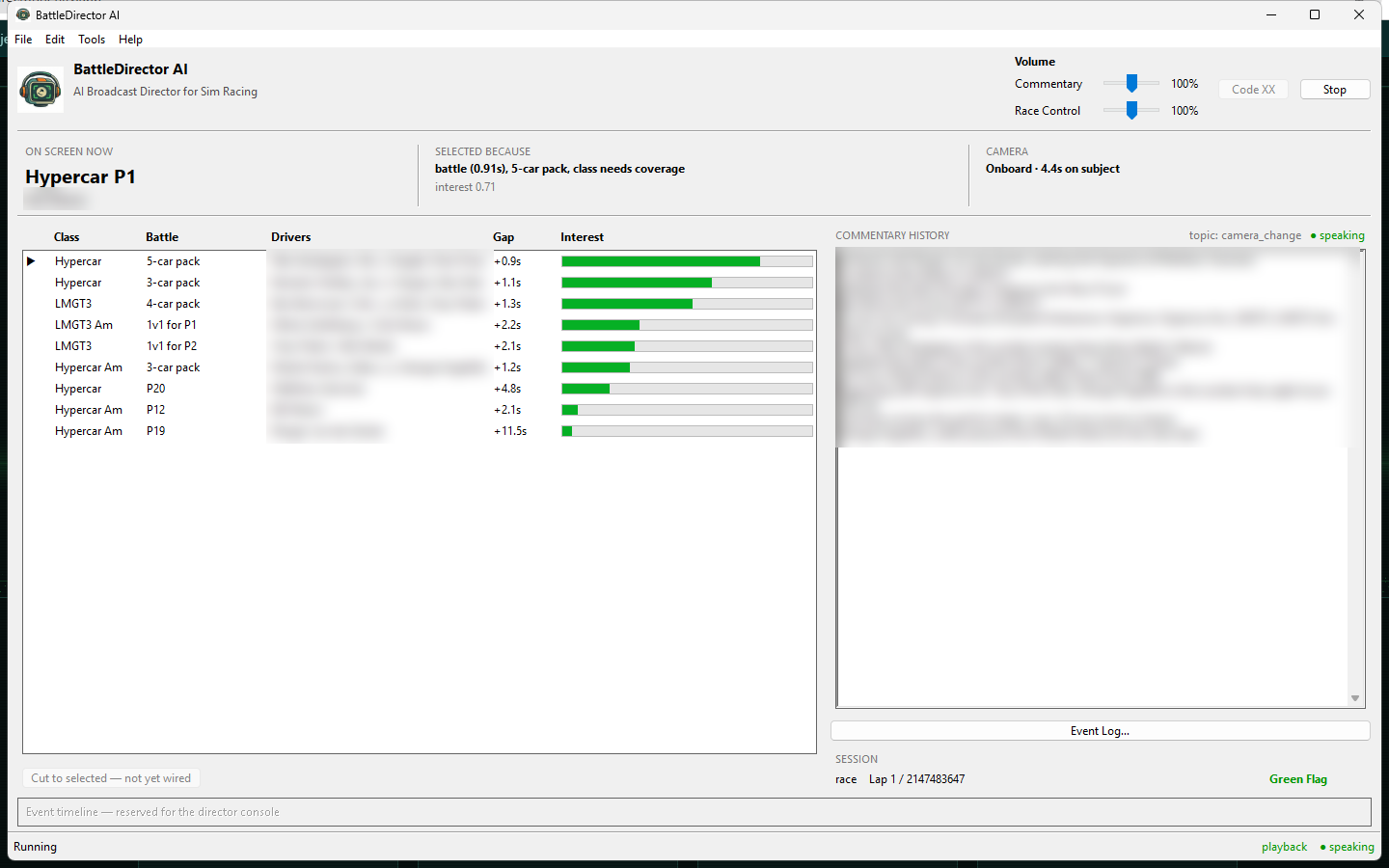
What you don't get from them is any sense of what they are choosing, or why. The camera cuts, and you either liked it or you didn't. BattleDirector shows its working: every cut comes with the reason it was made - "battle (0.91s), 5-car pack, class needs coverage" - alongside an interest score for every car on track. When it picks something you would not have, you can at least see what it thought it was doing.
And picking the camera is only part of the challenge. None of them commentate.
I run a Le Mans Ultimate league - is there anything else like this?
Not that we are aware of. Le Mans Ultimate has no automatic camera direction of its own, and no third-party plugin provides it. For LMU leagues BattleDirector is not a better option, it is the only one.
How does the yearly pass work?
You buy a year. For that year you get every update shipped, including new features.
What happens if I don't renew?
Your copy keeps working, indefinitely. The pass buys updates, not access - if it lapses, the version you already have carries on running exactly as it did. Renewing starts another year of updates whenever you want them.
Does the commentary cost extra?
No. Commentary is built in and uses a bundled voice engine with eight voices - no account, no API key, no per-word billing. If you would rather use ElevenLabs voices you can supply your own API key and subscription, but that is entirely optional.
Do I need to be there while it runs?
No - that is the point. Start it before the session and leave it. It handles the formation lap, the race, faster cutting on the last lap, and a walkthrough of the top three finishers after the flag, without input.
The flip side is worth knowing: while it is running, it is the broadcast. If it stops, the cameras stop moving and the commentary stops with them. Nobody needs to watch it, but somebody should be reachable.
What if I already have a commentator?
Turn the commentary off and run it as a camera director only. Your commentator then gets a broadcast that is already cutting to the right battle, which is usually the hard part of talking over a race.
How does it decide which car to show?
Every car gets an interest score built from six weighted inputs: whether it is in a battle (25%), track position (20%), recent incidents (20%), side-by-side running (15%), pit activity (10%), and how long since it was last shown (10%). The highest score wins.
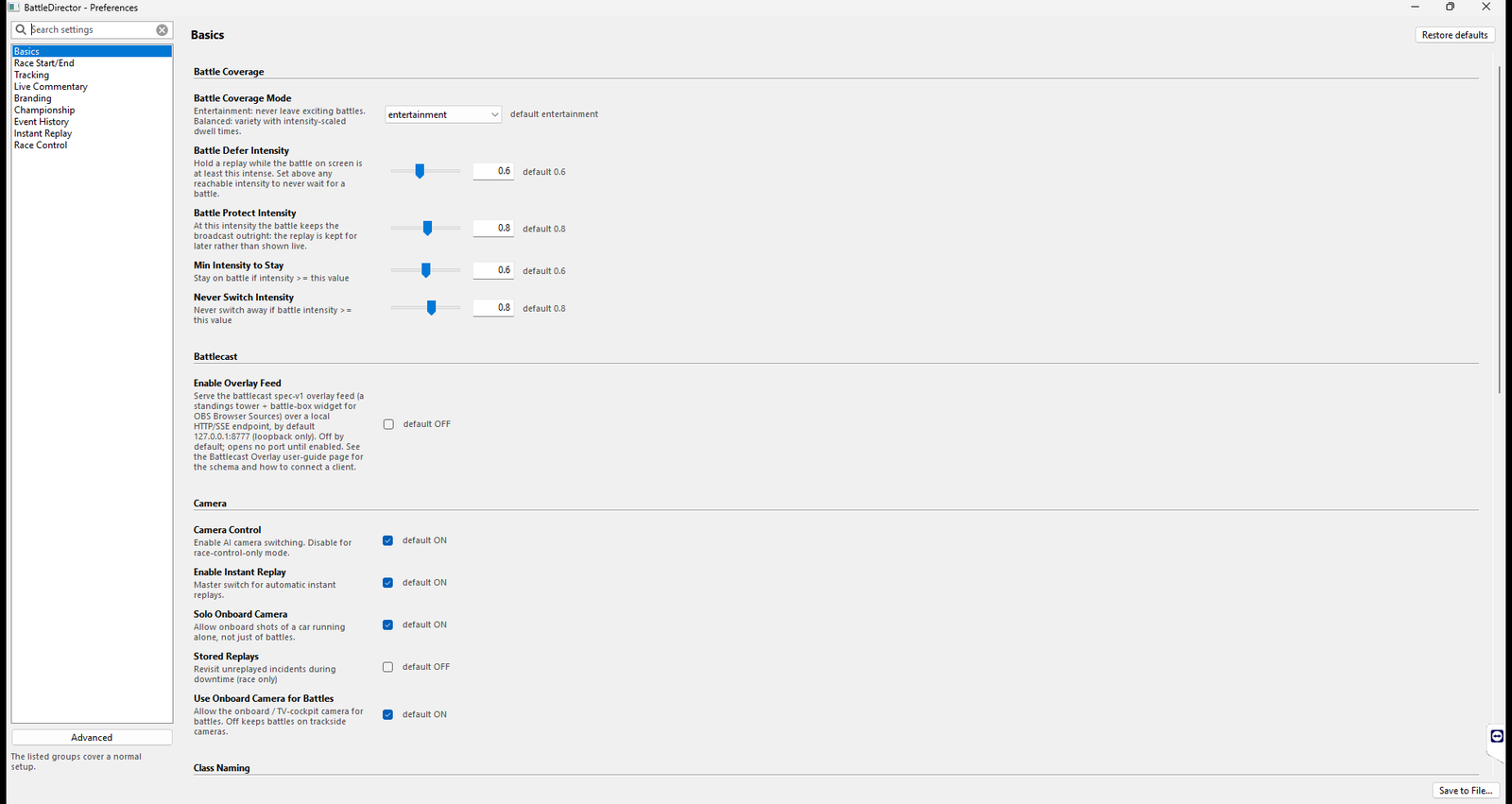
On top of that sit priority rules: lead changes cut instantly, major incidents override everything, and an intense battle is protected from being cut away from. A maximum dwell time forces variety so the broadcast never goes stale on one car.
How does it choose camera angles?
Trackside by default, because it gives spatial context. Onboard for close one-on-one battles - roughly a 50 to 65 percent chance when the gap is under 1.5 seconds. Below 0.15 seconds it always goes to the cockpit, because that is the shot that moment deserves. Packs of three or more cars are forced trackside, where you can actually see them.
What does the commentary actually sound like?
Short, reactive lines called as things happen, rather than a monologue. Real output reads like this:
"Trouble for the 33 car in LMGT3!"
"Hartley through in Hypercar Am - now P two!"
"P four, the number twenty three Aston Martin Valkyrie."
"20 cars now racing. 9 minutes at Kyalami Endurance."
It is class-aware, so in a multi-class field it says "takes the lead in Hypercar" rather than just "takes the lead". There are 67 event types across 13 categories behind it - overtakes that stick and ones that don't, incidents, purple sectors, fuel, session timing, race control, the podium.
Audio samples are in the Discord, and the clip at the top of this page is unedited output.
Does it handle the grid walk and the podium?
Yes, and this is one of the more finished parts of it. On a manual formation lap it runs an F1-style grid walk, working through the field class by class and introducing each driver and car. At the end of qualifying it reads out the results. After the flag it walks through the finishers.
The whole session gets covered, not just the racing in the middle of it.
Can it run a safety car or a virtual formation lap?
There is a race control system that handles a Virtual Formation Lap and Code XX, a safety car analogue that can trigger automatically when it detects a cluster of incidents. Both announce over their own race control voice.
Both are early preview. They are off by default, and they are newer than the rest of the director. The grid walk and session ceremony above are battle tested; these are not yet.
Does it understand multi-class racing?
Yes. It reads vehicle class from telemetry, only treats cars in the same class as fighting each other, and tracks screen time per class so the prototypes don't take all the coverage. Class appears in commentary and in the on-screen labels.
Does it know what's happening in the championship?
It can, if you run rFactor 2 Log Analyzer. Point BattleDirector at your r2la championship and it folds standings into the commentary - including recognising when two drivers battling on track are close enough on points for the pass to matter to the title.
r2la is the only standings source supported at the moment, and it is off until you set it up.
Does it behave differently in qualifying and the race?
Yes. In practice and qualifying it favours cars on hot laps and improving times, and cuts faster to catch them. In the race it runs full battle detection, switches instantly for lead changes, tightens up on the last lap, and finishes with the top three.
Can it trigger instant replays?
Yes. It detects incidents - large position losses, sudden speed drops, cars stopped on track - and rolls a replay covering roughly the fifteen seconds before it happened. If a good battle is running at the time, the replay is held and played once the action calms down, so you never cut away from live racing for it.
What do I need to run it?
Windows, and rFactor 2 or Le Mans Ultimate. That is the whole list.
Where does it run - can I use a dedicated broadcast PC?
Yes, and that is the intended setup. BattleDirector runs on the machine running the game client you are spectating from - your broadcast PC. It does not run on the server, and it does not run on any driver's rig.
Will it slow my sim down?
Two answers. Your drivers are unaffected - it never runs on their machines, so nobody's racing performance is touched by it.
And on the broadcast PC it is light. It reads telemetry and makes decisions; it renders nothing. If that machine can already spectate and stream at the same time, BattleDirector is not what will run it out of headroom.
Does it work with a dedicated server and league races?
Yes - that is what it is built for. Join your league's server as a spectator on the broadcast PC, start BattleDirector, and it directs from there.
Does it work with OBS and other streaming software?
Yes, with any of them. BattleDirector controls the game's cameras, not your stream, so from your streaming software's point of view nothing changes - you capture the game window exactly as you do now. Commentary plays to the system default audio device, which you capture as another source.
Will it work with my existing stream overlays?
It doesn't touch them. Whatever overlays you run today keep working unchanged. Driving the sim's own built-in broadcast overlays from the director's decisions is planned but not shipped.
Can I use my own commentary voice?
Yes. The bundled voice engine supports voice cloning from a reference audio clip. If you are using ElevenLabs instead, you can point it at a custom voice ID.
Does it integrate with Discord?
Yes, for race control. A Discord bot joins a voice channel and reads race control announcements to your drivers - formation lap, Code XX, green flag. Not the full commentary, which would be a distraction to someone driving.
Those same announcements can optionally go out over the commentary audio as well, so viewers hear them too.
Can I change how it behaves?
Extensively. Scoring weights, minimum and maximum dwell times, onboard probability, battle thresholds, replay timing and cooldown, and which commentary events fire are all configurable from a settings panel.
Every grid deserves a pro broadcast.
BattleDirector is in active beta, and preview access goes out through the Discord ahead of Steam early access. Clips and the launch date land there first too.